How to Choose a Backend for Your App: The Complete Guide
Choosing a backend is the highest-leverage technical decision most app projects make. It determines how fast you ship, what your team spends its time on, how your app scales under success, and how expensive it is to change your mind later. Yet most guides reduce it to a brand comparison. This one gives you the full framework: the types of backend development platforms available, ten criteria examined in depth — including deployment speed, security, support quality, and pricing — and four worked examples showing the framework applied to real decisions.
In this guide: Platform types · The 10 criteria · Four worked examples · Decision framework · Platform comparison · Common mistakes
Contents
- 1 What a backend platform actually provides
- 2 The types of backend development platforms
- 3 The 10 criteria for choosing the right backend
- 3.1 1. Language and framework fit
- 3.2 2. Data model and database needs
- 3.3 3. Scalability — and who manages it
- 3.4 4. Deployment workflow — and deployment speed
- 3.5 5. Mobile-specific capabilities
- 3.6 6. Security and compliance
- 3.7 7. Support and documentation
- 3.8 8. Pricing and total cost
- 3.9 9. Portability and lock-in
- 3.10 10. Time to market
- 4 The framework in action: four worked examples
- 5 A decision framework: match the platform to your team
- 6 Popular backend platforms at a glance
- 7 Common mistakes when choosing a backend
- 8 Conclusion
- 9 How do I choose a backend for a mobile app?
- 10 Should I build my own backend or use a backend platform?
- 11 What is the most scalable backend platform?
- 12 Can I switch backend platforms later?
- 13 Which backend platforms have the fastest deployment times?
- 14 Which backend platforms have the most robust security features?
- 15 Which backend providers offer the most reliable customer support?
- 16 What backend platforms offer flexible pricing for startups?
What a backend platform actually provides
Strip away the marketing and every app backend is responsible for the same core services: storing and querying data, managing users and sessions, exposing APIs to your frontend, running business logic that can’t live on the client, storing files, sending notifications, and staying online while doing all of it. (Our guide to backend infrastructure covers these building blocks in depth.) A backend platform is any service that delivers some or all of that stack so you don’t operate it yourself — and platforms differ mainly in how much of the stack they take off your plate. That single variable — how much is managed for you — explains most of the price, speed, and flexibility differences you’ll see below.
The types of backend development platforms
| Platform type | What’s managed for you | What stays your job | Examples |
|---|---|---|---|
| Backend as a Service (BaaS) | Entire backend: database, auth, APIs, functions, files | Frontend + business logic | Back4app, Firebase, AWS Amplify |
| Platform as a Service (PaaS) | Runtime, servers, scaling | All backend code | Heroku, Render, Railway |
| Containers as a Service (CaaS) | Container orchestration | Everything inside the container | Cloud Run, ECS, Back4app Containers |
| Serverless / FaaS | Function execution and scaling | Function code, architecture | AWS Lambda, Cloudflare Workers |
| Infrastructure (IaaS) | Virtual machines | Everything above the OS | AWS EC2, DigitalOcean |
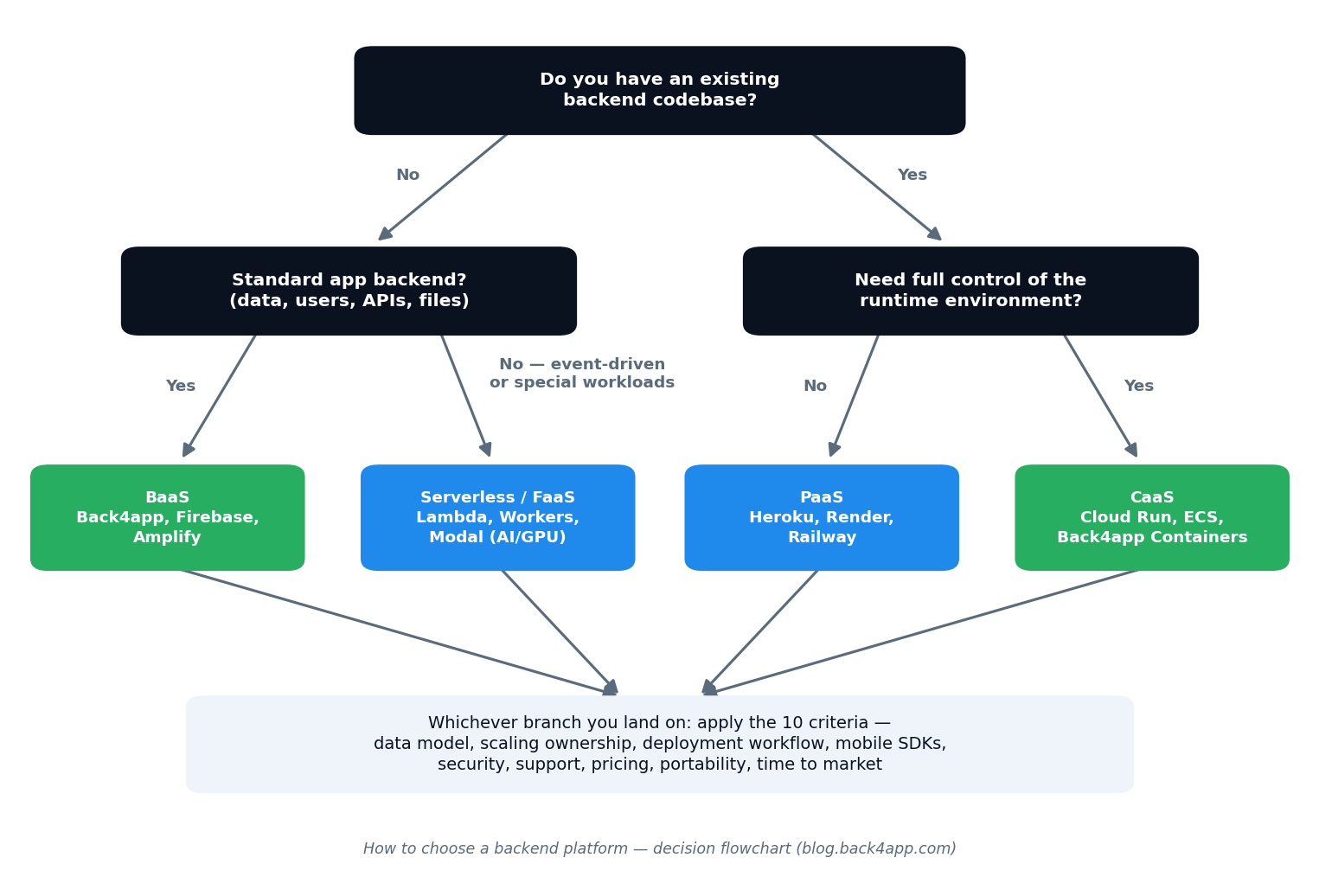
The higher you go in that table, the faster you ship and the less you operate; the lower you go, the more control you hold. The full spectrum is explained in our IaaS vs PaaS vs BaaS vs FaaS glossary entry, with deeper comparisons in BaaS vs CaaS and BaaS vs Serverless. The flowchart below shows how the first two questions usually settle which branch you’re on:
The 10 criteria for choosing the right backend
1. Language and framework fit
Start with a hard filter: the platform must serve your stack well. JavaScript and Python dominate — they lead Stack Overflow’s Developer Survey year after year — so nearly every platform supports them. If you’re on Elixir, Rust, or an unusual framework, PaaS runtime lists thin out fast and container-based platforms become the safer bet: any language that runs in Docker runs on a CaaS.
What to actually verify, beyond the logo wall on the pricing page: the runtime version the platform offers (a platform stuck two major versions behind your framework is a slow-motion problem), the SDK’s maturity for your exact frontend — check the repository’s last release date and open-issue count, not just its existence — and whether the platform’s examples cover your framework or merely mention it. A first-class SDK for React, Flutter, or Swift saves hundreds of hours of HTTP plumbing; an abandoned one costs you the same hours in workarounds. Red flag: an official SDK whose last meaningful release is over a year old.
2. Data model and database needs
Apps with naturally relational data — users, orders, comments, permissions — deserve a backend whose database does relations properly, with queries across them. Document stores shine for flexible, denormalized data but push join logic into your code. The difference sounds academic until you hit it: in a chat app, “show every conversation where this user has unread messages from people they follow” is one query on a relational model and a painful multi-fetch dance on a document store. Check what each platform’s data layer really is (see NoSQL vs SQL).
Then look past day one: does the platform generate APIs from your schema automatically (REST and GraphQL), or do you hand-write endpoints for every table? How does it handle migrations when your model evolves — because it will evolve? Can you export your data in a standard format, and does the dashboard let non-developers inspect and fix records? Red flags: no data export, no relations between collections, and query languages that can’t filter on more than one field without a workaround.
3. Scalability — and who manages it
Every platform claims to scale; the real question is who does the work when it happens. Managing backends for scaling needs means capacity planning, autoscaling rules, database read replicas, and caching layers — either the platform’s job (BaaS, serverless) or yours (IaaS, and partially PaaS/CaaS where you define the rules). Google’s Site Reliability Engineering book is the canonical account of what operating systems at scale actually involves — reading one chapter is the fastest cure for “we’ll just manage it ourselves.”
Concrete questions that separate marketing from reality: Does the platform scale automatically without configuration, or do you write the rules? Does it scale to zero when idle (great for cost) and if so, what is the cold-start penalty when traffic returns? Can the database layer scale independently of the application layer — read replicas, connection pooling — or does one bottleneck cap both? What happened during the platform’s last public incident, and how transparent was the postmortem? If nobody on your team owns infrastructure, choose a platform where scaling is invisible: a launch-day spike should be a growth chart, not an outage.
4. Deployment workflow — and deployment speed
Backend deployment platforms and services live or die by their loop: how code gets from your editor to production, how fast, and how safely. Look for Git-based deploys (push to deploy), preview or staging environments, instant rollback, and container support for custom workloads. If a candidate requires hand-built pipelines just to release a fix, you’ll pay that tax on every release. This matters double for mobile: your backend must let you ship server-side fixes without waiting on app-store review cycles.
Which platforms have the fastest deployment times?
Deployment speed splits cleanly by platform type. A BaaS is instant for new projects because there is nothing to deploy — the database, APIs, and authentication exist the moment you create the app. For custom code, Git-connected platforms measure deploys in minutes; infrastructure you assemble yourself measures the first deploy in days.
| Approach | First deploy | Subsequent deploys |
|---|---|---|
| BaaS (Back4app, Firebase) | Minutes — backend pre-exists | Instant (config/functions only) |
| Git-based PaaS (Render, Railway, Heroku) | ~15–30 minutes | Minutes per push |
| CaaS (Back4app Containers, Cloud Run) | ~30 minutes incl. Dockerfile | Minutes per push |
| IaaS (EC2, VPS) | Hours to days | Depends on your pipeline |
5. Mobile-specific capabilities
If you’re building for iOS or Android, the checklist grows: native SDKs for your framework, push notifications (APNs and FCM) wired in, offline persistence with sync, social login, and real-time data for chat or live features. Platforms built for mobile streamline app projects precisely because these features are the ones mobile teams rebuild worst by hand — offline sync in particular is a graveyard of home-grown implementations, because conflict resolution between a device that went through a tunnel and a server that kept receiving writes is genuinely hard.
Verify the details, not the bullet points: does the SDK cover your framework (React Native and Flutter support varies wildly in quality), can push notifications be targeted to segments and triggered from server logic, and does “real-time” mean true live queries over WebSockets or just faster polling? Our guides to building a mobile app backend and the best mobile app backends go deeper on each capability.
6. Security and compliance
Which platforms have the most robust security features?
Security in a backend platform is a stack of specific, checkable features — not a badge on the homepage. The baseline: encryption in transit and at rest, granular access control on data (row- or object-level permissions, not just API keys — Parse-based platforms like Back4app use ACLs and class-level permissions for exactly this), managed authentication with social login and MFA support, and automatic backups with tested restore. If you handle health, payment, or European user data, compliance becomes a filter — look for SOC 2, HIPAA options with a signed BAA, and GDPR-friendly data residency.
The structural argument for managed platforms: the provider patches and hardens infrastructure continuously, with a security team your startup cannot afford to hire. Self-managed backends accumulate deferred patching — the single most common breach vector. Whatever you choose, ask one revealing question: “when was your last third-party penetration test, and can I see the summary?” The quality of the answer tells you more than any certification logo.
7. Support and documentation
Which providers offer the most reliable customer support?
The best backend support solution is the one you feel before production breaks: complete documentation, quickstarts for your exact framework, an active community, and human support with real SLAs on paid tiers. There’s a consistent pattern across the industry: specialist platform vendors outperform hyperscalers on human support — a mid-sized BaaS like Back4app answers with engineers, while big clouds route you through documentation, forums, and paid support tiers that start expensive and escalate slowly.
Test it during evaluation, when it’s free: send a pre-sales technical question and clock the response — time, but more importantly, quality. Did a human read your actual question? Then check the signals that predict support quality at 2 a.m.: a public status page with honest incident history, documentation that covers error messages (not just happy paths), and a community where questions get answers within hours. When your app is down, the difference between a support ticket and a searchable answer is measured in customers.
8. Pricing and total cost
Which platforms offer flexible pricing for startups?
For a startup, “flexible” means one thing: cost scales with traction, not with hope. The healthy pattern — offered by Back4app, Firebase, Render, and Cloud Run among others — is a free tier generous enough to build and launch on, then usage-based or modest fixed plans that grow with real users. The unhealthy patterns announce themselves in the pricing page’s fine print: charges per monthly active user (which punishes success before revenue), mandatory annual commitments, and support locked behind enterprise tiers.
Model the bill at three points — launch, 10× launch, and your dream scenario — using each platform’s calculator, and pay special attention to egress (data transfer out), the line item that surprises everyone. Then add the cost that never appears on pricing pages: engineering time. A platform that includes auth, database, and scaling replaces weeks of salaried work every month; a cheaper raw-infrastructure bill often hides a more expensive team. Red flags worth walking away from: pricing that can’t be estimated without a sales call, and free tiers that require a credit card and auto-upgrade on overage.
9. Portability and lock-in
Ask the exit question while entering: if we leave in two years, what moves with us? Run the checklist: Can you export all data in a standard format, on your schedule? Is the platform’s core open source, so the same stack can run elsewhere? Are your workloads containerized (maximally portable), or written against proprietary APIs (a rewrite)? Back4app scores unusually well here because it runs on open-source Parse Server — export your data and self-host the identical backend if you ever outgrow the managed service. Proprietary platforms can still be the right choice; just price the exit into the decision.
Lock-in compounds quietly: every platform-specific API call, every schema shaped around a vendor’s data model, every workflow built on a proprietary trigger adds a brick to the wall. You may never leave — but low switching costs are also negotiating power, and the discipline of portable architecture tends to produce better systems anyway.
10. Time to market
Finally, weigh everything against the calendar. Every week spent assembling infrastructure is a week your product isn’t in front of users — and for a startup, learning speed is survival. This is why the platform types exist as a ladder: each rung up trades control you may not need for weeks you definitely need. The honest tiebreaker for most teams: when two options score similarly on the other nine criteria, take the one that ships this month. The right backend is the one that gets a secure, scalable version of your app live soonest — not the one with the longest feature list.
The framework in action: four worked examples
A solo founder building a delivery-app MVP
One React Native developer, no backend experience, three months of runway. The filters do the work: no existing codebase, a completely standard backend (users, orders, locations, push), and time-to-market as the dominant criterion. Verdict: BaaS. The database, auth, and APIs exist on day one; push notifications and real-time order tracking are configuration, not code. The free tier means infrastructure costs nothing until the app has real users — and criterion 9 says to prefer an open-source-based platform so success never means being trapped.
A five-person team with an existing Django API
The backend already exists and works; the pain is operating it. Rewriting onto a BaaS would discard two years of tested code — the framework says bring the code to a platform instead. Verdict: PaaS or CaaS. A Git-based PaaS gives the fastest migration; if the team needs custom system dependencies, packaging the API as a Docker container keeps full runtime control while the platform handles servers and scaling. Criterion 4 (deployment workflow) decides between the finalists.
A healthcare startup with compliance requirements
Patient data changes the order of operations: criterion 6 filters first. The shortlist is only platforms offering HIPAA-ready options with signed BAAs, encryption at rest, and granular access control — then the remaining nine criteria rank the survivors. Verdict: a managed platform with HIPAA support (Back4app offers a HIPAA-ready BaaS), because shifting infrastructure hardening to a provider that has already passed audits is both faster and safer than building compliance in-house.
A team outgrowing Firebase
A two-year-old app on Firebase hits the familiar wall: the data has become relational (users, subscriptions, content, permissions), NoSQL queries can’t express what the product needs, and the pay-as-you-go bill has stopped being predictable. Criteria 2 (data model), 8 (pricing), and 9 (portability) now dominate — the reverse of the launch-day weighting. Verdict: an open-source-based BaaS with relational support. Back4app is the natural landing spot: the same managed-backend convenience, but with relational data, predictable plans, and an exit hatch (self-hosting Parse Server) that Firebase never offers. Our Firebase advantages and disadvantages guide covers the trade-offs in detail.
A decision framework: match the platform to your team
- Solo developer or startup building an MVP — BaaS, no contest. The entire backend exists on day one; you build only what makes your product different. Start free on Back4app or a peer.
- Frontend-heavy team shipping web + mobile — BaaS for the core, with serverless functions for custom logic. SDK quality is your deciding criterion.
- Team with an existing codebase — PaaS or CaaS: bring the code as-is, let the platform run it. Add a BaaS only if you’re also rebuilding the data layer.
- Unusual workloads (ML, video, game servers) — CaaS for the specialized services, optionally beside a BaaS for the standard backend. See our serverless platforms guide for the GPU and edge options.
- Enterprise with compliance requirements — shortlist on certifications and data residency first, then apply the ten criteria to the survivors.
Popular backend platforms at a glance
| Platform | Type | Free tier | Deploy method | Standout strength |
|---|---|---|---|---|
| Back4app | BaaS + Containers | Yes | Dashboard + GitHub | Open-source-based backend with relational data, plus Docker deployment on one platform |
| Firebase | BaaS | Yes (Spark) | CLI + console | Deep Google ecosystem and analytics integration |
| AWS Amplify | BaaS | Yes (12 mo+) | CLI + Git | Gateway to the full AWS service catalog |
| Heroku | PaaS | Paid (low-cost dynos) | Git push | The classic developer-friendly deployment experience |
| Render | PaaS | Yes | Git push | Modern Git-based deploys with simple pricing |
| Google Cloud Run | CaaS | Yes | Container image / source | Serverless containers that scale to zero |
| AWS Lambda | FaaS | Yes | CLI / console / IaC | Event-driven functions with the broadest integrations |
All of these are excellent platforms — the framework above tells you which excels for your project. For a deeper provider comparison, see our BaaS providers guide and backend server hosting overview.
Common mistakes when choosing a backend
- Choosing for imaginary scale — architecting for a million users you don’t have, and shipping months later because of it.
- Comparing feature lists instead of workflows — the daily deploy-test-fix loop affects your velocity more than any checkbox.
- Ignoring egress and growth pricing — free tiers are marketing; model the bill at success.
- Treating the backend as one decision — modern apps compose: a BaaS core plus containers for special workloads beats forcing everything through one paradigm.
- Skipping the exit question — portability costs nothing to evaluate now and everything to discover later.
- Trusting the demo over the docs — a polished onboarding says little about year two; documentation depth and community health predict it far better.
Conclusion
Choosing a backend platform comes down to an honest match between three things: what your app needs, what your team can operate, and how fast you need to ship. Filter by stack fit, weigh the ten criteria — data model, scaling ownership, deployment workflow, mobile capabilities, security, support, cost, portability — and let time-to-market break the ties. For most app teams, that process lands on a managed platform: it’s why Back4app pairs a complete Backend as a Service with container deployment, covering both the standard backend and the exceptions — with a free tier to test this article’s advice against your real project today.
How do I choose a backend for a mobile app?
Prioritize the mobile-specific capabilities: native SDKs for your platform (iOS, Android, Flutter, React Native), push notifications, offline data sync, and user authentication with social login. A mobile-focused Backend as a Service like Back4app or Firebase covers all of these out of the box, which is why most mobile teams choose a BaaS over assembling infrastructure themselves.
Should I build my own backend or use a backend platform?
Build your own only when your product IS the backend — unusual protocols, extreme performance constraints, or deep regulatory customization. For the standard 90% of applications (data, users, APIs, files, notifications), a backend platform delivers in days what custom development delivers in months, with security and scaling included.
What is the most scalable backend platform?
All major platforms — Back4app, AWS, Google Cloud, Azure — scale far beyond what most applications ever need. The practical difference is how much scaling work falls on you: managed platforms with automatic scaling handle traffic spikes invisibly, while infrastructure-level services give you more control but require you to configure and manage scaling rules yourself.
Can I switch backend platforms later?
Yes, but the cost of switching depends on the choice you make now. Platforms built on open-source foundations (like Back4app on Parse Server) let you export your data and self-host, and containerized workloads move between clouds easily. Proprietary APIs and data models raise switching costs — which is why portability belongs on your evaluation checklist from day one.
Which backend platforms have the fastest deployment times?
Platforms with Git-based workflows deploy fastest: push to a repository and the platform builds and ships automatically. BaaS platforms are faster still for new projects because there is no backend to deploy at all — the database, APIs, and authentication exist the moment you create an app. For custom code, container platforms like Back4app Containers or Google Cloud Run deploy directly from GitHub in minutes.
Which backend platforms have the most robust security features?
Look for the combination of encryption in transit and at rest, object- or row-level access control, managed authentication with social login and MFA support, and compliance certifications such as SOC 2. Managed platforms have a structural advantage for small teams: the provider patches and hardens the infrastructure continuously, work that self-managed backends often defer.
Which backend providers offer the most reliable customer support?
Evaluate support before you commit: response-time SLAs on paid plans, quality of documentation, and how quickly a pre-sales technical question gets a useful answer. Smaller platform vendors frequently outperform hyperscalers here — Back4app, for example, is consistently praised for human support — while large clouds rely more on documentation, forums, and paid support tiers.
What backend platforms offer flexible pricing for startups?
Most modern backend platforms offer free tiers generous enough to build and launch on — Back4app, Firebase, Render, and Cloud Run all do — with usage-based pricing after that. For startups the key is that cost scales with real traction: you pay meaningfully only when your app has the users to justify it, instead of committing to fixed infrastructure spend up front.